
Construction site reporting · English and العربية
Site reports that write themselves, straight from WhatsApp.
Engineers, foremen and safety officers send voice notes and photos from the slab. Groundwork sends back a formatted report on the right form, files it under the project, and keeps every issue, snag and safety item open until someone closes it.
- 11 construction forms
- Open items register
- Weekly reports
Test run
From the slab to a signed-off form
A test run, sped up. The messages and the PDF are the real output. The chat screen is drawn from the message log, not recorded from a phone.
How it works
From voice note to closed item
- 01
Join the project
Each project gets a six-letter code. Site staff send join and the code once. Project name, client, consultant and contract number fill themselves in from then on.
- 02
Send it as it happens
Voice notes and photos from the slab, the stairwell or the car. English, Arabic or both. Tap Generate report when done, or it builds at the end of the day.
- 03
Get the PDF back
A summary in the chat and a numbered form with sign-off boxes. Reply with a correction and it reissues the next revision.
- 04
Close what was raised
Issues, snags, failed inspections and safety items go on the register as A-0001, A-0002. Close them from the office, or on site with close A-12.
On site
It works the way site staff already work
No app, no forms, no training. A voice note from the slab is enough. Ten photos get one reply, not ten, and the Generate report button arrives about five seconds after the last message.
Tap through the guided demo on the phone, or switch to Live agent and send it a voice note, a photo or a message. It’s the same agent site teams use on WhatsApp: Claude writes your report and reads your photos, and you get the real PDF back.
- Asks role and name once, then uses the right form
- Corrections reissue the report as the next revision
- Answers open items and close A-12 right in the chat




Today
This is a guided demo. Nothing you tap here is sent anywhere.

- A-0012Edge protection missing, level 3 grid 4Safety · Ahmed (HSE)high
- A-0013Block delivery short, 2000 of 5000Issue · Procurementhigh
- A-0014Honeycombing on column C4, NCR 27Finding · Contractormedium
- A-0015Kitchen tiles hollow, apartment 502Snag · Tilermedium
In the office
Nothing raised on site gets lost
Every company gets a workspace: projects, site team, reports and one register of everything still open, with owners, due dates and severity.
Open items register
Issues, snags, NCRs, safety observations and delays, numbered and tracked to close. Filter, reassign, export.
Site diary
Each day’s reports, the highest headcount reported and the weather, at a glance and as a 90 day export.
Weekly progress report
One click compiles the week’s daily reports into a client-ready report with the diary, the register and photos.
Weather on every daily
When nobody states it, the day’s weather is looked up for the site and clearly labelled as a lookup.
Join codes and QR
Print the code on the site notice board. Staff scan it and their reports land in the right project.
Exports for your records
Open items, reports and the diary as CSV files that open in Excel, Arabic included.
The paperwork
It asks your role, then uses your form
First pages from test runs, with made up test notes. Every one has numbered sections, a photo record, sign-off boxes and the notes as received.
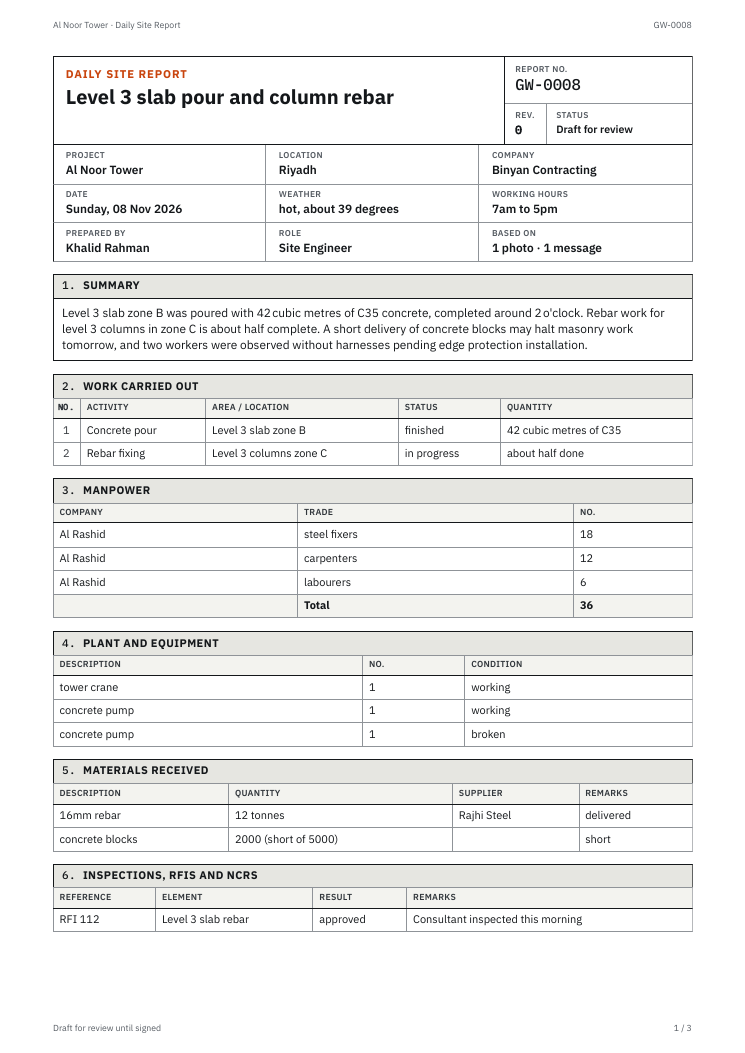
Work, manpower, plant, materials, issues, safety and tomorrow’s plan.
Accuracy
Every report is checked before it reaches the client
Groundwork writes only from what your team sent. When something doesn’t add up or is missing, the report says so instead of filling the gap.
- Concrete, Level 4 slabNotes say 42 m³, a later message says 45 m³Conflict
- Working hoursNobody mentioned themNot stated
- Photos12 attached, each numbered and timedAttached
- Sign-offEng. Faisal Al-QahtaniAwaiting
Reply on WhatsApp to resolve. The report updates on a new revision.
Numbers are cross-checked
Quantities, headcounts and times are matched against the notes. Anything that conflicts is listed for review.
Missing details are marked, never invented
If nobody gave working hours, the report says Not stated. Reply with the answer and it fills in.
Original notes stay attached
Each report ends with the messages as received, and every photo keeps its number and time.
Nothing issues without a signature
Corrections carry through every page on a new revision, and a person approves before it goes out.
Pricing
Pay for reports, not seats you don't use
Every plan includes the WhatsApp agent, all report types, photos, voice and video, the action register, the site diary and weekly reports. Prices in Saudi riyals per month, before 15% VAT.
Site
One project and its site team.
SAR 139 / month
About SAR 0.93 a report
- 150 reports a month
- 1 project
- Up to 5 site users
- Weekly report for every project
Team
A contractor running several sites.
SAR 609 / month
About SAR 0.81 a report
- 750 reports a month
- 5 projects
- Up to 25 site users
- Weekly report for every project
Company
Every project, the whole company.
SAR 2,359 / month
About SAR 0.79 a report
- 3,000 reports a month
- 20 projects
- Unlimited site users
- Weekly report for every project
Free for 14 days or 30 reports, no card needed.
More reports than your plan: SAR 0.70 each, added to the month's invoice.
Need more than 20 projects, your own WhatsApp number or on-premise hosting? Talk to us.
Questions
What people ask first
Do site staff need to install anything?
No. It’s a WhatsApp number. They send join and the project code once, then message it the way they message anyone else.
What can they send?
Voice notes, photos, videos, typed messages, locations and files, in any order. In a video it reads both what the camera shows and what is said.
Which languages work?
English and Arabic, or a mix of the two. Reports come out in the language of the notes, and replying Arabic or English gets a copy in the other.
How do issues get tracked?
Every issue, snag, failed inspection, safety observation, delay and incident in a report becomes a numbered item, like A-0012. It stays open on the project’s register until someone closes it in the dashboard, or on WhatsApp with close A-12 and a note.
Where does the weather come from?
From whoever reports it. If nobody does, the daily report looks up the day’s weather for the project’s location and labels it Open-Meteo, so nobody mistakes it for an observation.
Can it make things up?
It’s told not to, and the app checks. Any figure that isn’t in the notes is flagged under Check before issuing, gaps show as Not stated, and the original notes are attached. AI can still misread things, so every report stays a draft until a person signs it.
What about the weekly report?
Pick a project and a week in the dashboard. It compiles the daily reports into a Weekly Progress Report with the site diary, the open items register and photos, and checks every figure against the daily reports.
Can my team use the WhatsApp number today?
It’s a pilot number for now, so it only replies to approved phones. Anyone can talk to the same agent on the phone on this page, or upload notes at /try, and companies get their own number when they go live.
Who can see a report?
Your company’s dashboard logins see your projects. Each report also has a private link with a long random address, so the PDF can be forwarded to a client or consultant. Anyone holding that link can open it, so share links with care. The service administrator can see all reports.
Set up your first project in two minutes
Create the workspace, add the project, print the join code. Your site team does the rest from WhatsApp.
Message +1 555 629 1563 on WhatsApp from site.
Pilot number: it replies to approved phones for now. Anyone can talk to the agent on this page.